Running a physical Windows (XP) partition in VMware from Linux

For the last month I have been able to boot and run my laptop's Windows partition from inside a vmware server that runs under my (dual boot) Mandriva Linux partition. This is very useful when I need to run something in windows but don't want to shut down Linux and reboot.

I found the instructions on Scott Bronson's blog  to be accurate and complete!

Continue reading

Transcoding video to work with Java Media Framework (JMF) on Linux

Using the Java Media Framework is an easy way to build java applications that can record, edit, and play videos, but the number of video codec's that it supports is limited. Unless you want to go with a quicktime format, MPEG1 is a good choice (although the files can be a bit large) for portability. When starting with digital video, you can use ffmpeg to convert and encode the video as follows: Continue reading

Hacking the LG CU-500 with BitPim

One nice thing about the LG CU500 Phone is that BitPim (an application that works on Linux as well as windows) will allow you to edit it's file-system easily. This makes it relatively easy to modify some of the bad things that Cingular has done to the phone.

By default, Cingular locks the phone down so that unsigned Java Apps are forced to ask for Internet access on every single URL they load. Needless to say, this is very annoying when using a network based application such as Google maps.

Continue reading

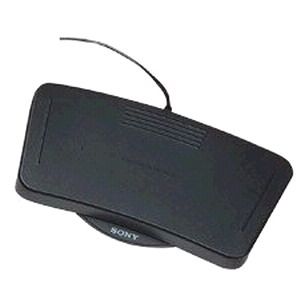
Using a Sony FS-85 foot control with Linux and Mplayer

While transcribing, I wanted to use a Sony FS-85 foot control unit to pause and rewind the audio while I typed.

Sony Foot Control Unit FS-85

When plugged into linux it appears as a keyboard and gives various key-press codes when you hit the left or right petal. (The right side gives F10 when you press down, F11 when you release, etc). I was able to make this control Mplayer by adding a ~/.mplayer/input.conf file with the following lines in it:

Continue reading

Search and Replace a string in many files recursively on unix

find /net/hc287/summetj/research/dist1 -name "Root"
-exec perl -pi.bak -e's/summetj\@flux.cc.gatech.edu:/summetj\@wilks1.cc.gatech.edu:/g' {} \;

The above command line will find all files named "Root" recursively under the  /net/hc287/summetj/research/dist1 direcotry and execute perl to replace the string "summetj\@flux.cc.gatech.edu:" with the string "summetj\@wilks1.cc.gatech.edu:"  It also keeps a backup of all the changed files as Root.bak, just in case….

The {} is replaced by the find command with the name of the file, while the \; tells find's -exec command where the program arguments end. The @ signs are escaped by \'s.  This is useful if you need to search and replace a string in many files in a directory tree to update some settings, for example, if the CVSROOT machine has been changed from flux to wilks1 and you don't want to do a full new checkout of 45MB over a slow link.
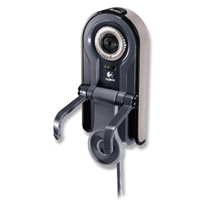
Logitech Webcam for Notebooks Pro on Linux

Logitech Webcam for Notebooks Pro Logitech QuickCam Pro for Notebooks (USB) is the USB web-cam I use. I like the small size and the clip on mounting system works great with the IBM X31 Thinkpad.
Mandrake 10.1 includes PWC (Philips Web Cam, the chipset that is used) support out of the box, but it only supports QCIF images (176×144, quite small) images. To get support for full size images (up to 640×480) you will need to install the kernel source rpm, and visit this site to download the pwc-10 package. I had no problems installing it from the full source code (as opposed to just the kernel patches). Continue reading